Every size at its own price
Regular and large are separate lines on the menu, each with its price.
ElMenu gives a café one menu to keep up to date. Guests scan a QR code and see today’s prices, with every size listed at its own price and anything that has run out switched off: that is the Starter plan, £14.99 + VAT a month. On Professional, £29.99 + VAT (£35.99 with VAT), your staff also key in counter and table orders, the kitchen sees them on a screen and a till records each payment, ready for the cash-up. It runs over an internet connection and leaves card payments to your own card machine.
Professional plan: £29.99 + VAT a month · 14 days free, no card needed · no lock-in
Quick overview
One menu behind the QR code, on the order screen and on paper.
Regular and large are separate lines on the menu, each with its price.
Take the last croissant off for today and it is back tomorrow by itself.
On Professional: takeaway orders, quick sales and a cash-up by payment method.
A café menu is short, but it never sits still: the bakes run out by mid-morning and the soup changes daily. Three things help, on every plan.
There is no size picker inside a drink. Each size is its own line with its own price, as on most café boards, and so is anything else you charge for separately:
| On the menu | Price |
|---|---|
| Latte, regular | £3.60 |
| Latte, large | £4.00 |
| Oat milk | £0.40 |
| Second shot | £0.50 |
The Duplicate button copies a drink with its description, so the second size is just a new name and a new price. Each line counts towards your plan’s limit: 50 products on Starter, 500 on Professional.
When the cinnamon buns have gone, switch them off and they vanish from the menu. The switch on each product stays off until you turn it back on. With the daily menu switched on, Today’s menu takes a dish off for today only and it returns tomorrow by itself; on Professional the kitchen screen does the same.
With the daily menu on, each dish can be set to show on certain weekdays, on set dates or between two dates: soup Monday to Friday, the full brunch menu at the weekend. It works by the day, not the hour, so it cannot take the breakfast rolls off at half past eleven.
Dishes can also carry photos, a description, diet labels and the allergens you list, and the menu can be read in 12 languages.
This part needs Professional. Whoever is on the counter signs in on a phone or tablet with their own PIN:
For something that needs no ticket, such as a bottle of water, Quick sale records the amount and how it was paid without listing the item. Those sales count in your cash-up but not in the report of what sold.
A screen behind the counter is optional; with two, each can show only its own categories, drinks by the coffee machine and food in the kitchen. See the kitchen display system and the order taking app.
You open the till with a float, and every sale is recorded with its payment method. At close, the till shows what it expects and you type in what you counted:
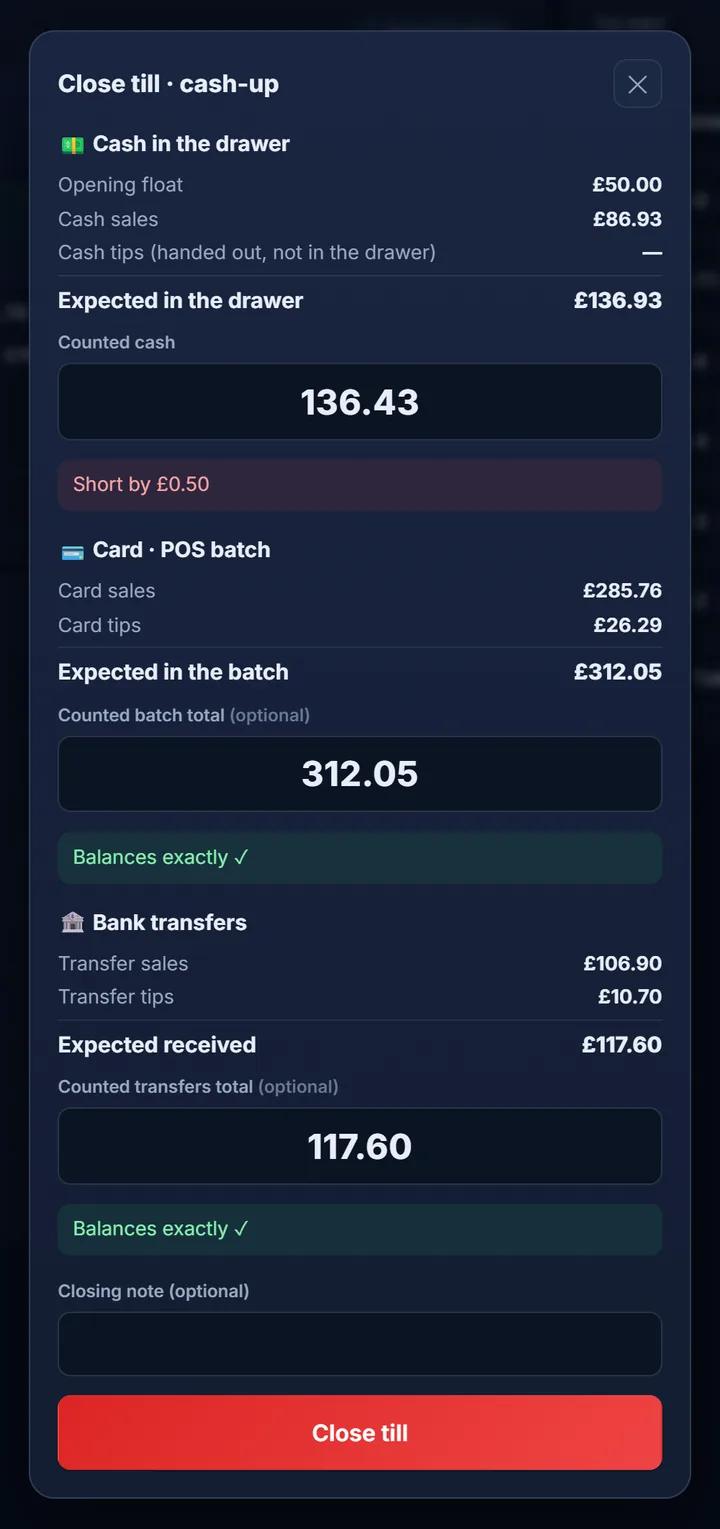
| A café’s Saturday | Amount |
|---|---|
| Opening float | £80.00 |
| Cash sales | £214.60 |
| Expected in the drawer | £294.60 |
| Counted | £292.60: £2.00 short |
| Card sales on the till | £731.40 |
| Card machine’s batch total | £731.40: it balances |
If you do not take tips at the counter, turn tips off and the till stops suggesting one. For the method itself, read how to cash up a till.
Paper on the counter and a QR code on the tables come from the same menu, so a price changed in the dashboard is right on the next print.
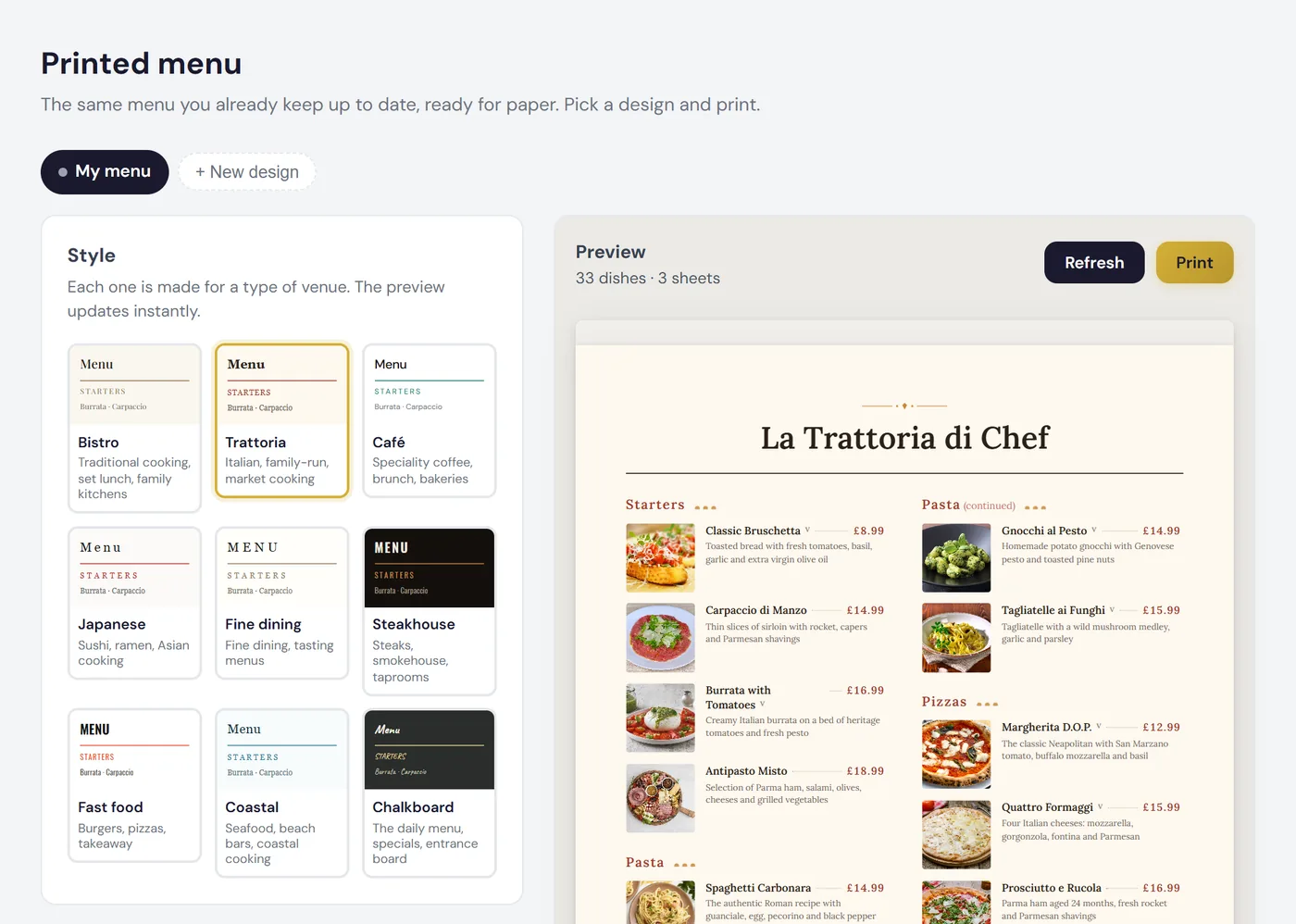
Bistro comes with every plan; Café and Chalkboard are two of the eight further styles on Professional and Premium. Change a dish after printing and the dashboard tells you the paper copy is out of date. See the menu maker and, for the QR code itself, QR code table talkers.
| Starter | Professional | |
|---|---|---|
| A month | £14.99 + VAT (£17.99 with VAT) | £29.99 + VAT (£35.99 with VAT) |
| Menu size | 50 products, 10 categories | 500 products, 50 categories |
| Counter orders, kitchen screen and till | No | Yes, with no fee per user or screen |
| Free trial | 14 days, no card | 14 days, no card |
Will 50 products do? Count your lines: 14 hot drinks in two sizes are 28; add 6 cold drinks, 10 bakes and 6 sandwiches and you are at exactly 50.
Nothing is charged automatically when the trial ends, and there is no lock-in. See pricing, or what a QR code menu costs in the UK for how it compares with the free options.
FAQ
Short, direct answers to common questions.
No. The QR code opens your menu to browse, with today’s prices. Your staff take the order, and payment goes through your own card machine or the cash drawer.
Yes. Each size goes on the menu as its own line with its own price, such as ‘Latte, regular’ and ‘Latte, large’.
No. Starter is the QR code menu on its own, for £14.99 + VAT a month. Counter orders, the kitchen screen and the till come with Professional.
Not by the hour. Dishes are scheduled by the day, and you can take any dish off for today with one tap, but nothing changes at a set time.
With ElMenu, £14.99 + VAT a month (£17.99 with VAT) for the menu alone, or £29.99 + VAT (£35.99) with counter orders, a kitchen screen and a till.
Add your drinks and bakes and ring up a test order at the counter. No card needed, nothing charged automatically.