Reprice in seconds
Change the price of a pint and every phone shows it straight away. Nothing to reprint.
ElMenu puts a pub’s food and drink on a QR code menu you can reprice in seconds, sends each round from the server’s phone to the right screen (drinks to the bar, food to the kitchen) and keeps a tab for every table until it is paid. That is the Professional plan: £29.99 + VAT a month (£35.99 with VAT) for the whole pub, however many screens and staff you have. The menu alone is £14.99 + VAT. It needs an internet connection, works alongside your card machine, and guests do not order from the QR code: your staff do.
Professional plan: £29.99 + VAT a month · 14 days free, no card needed · no lock-in
Quick overview
In the browser, on the phones and tablets you already have.
Change the price of a pint and every phone shows it straight away. Nothing to reprint.
Each screen shows only the categories you pick. No fee per screen.
Rounds add up on the tab; split it equally or by item at the end.
A pub menu is really two: a drinks list that changes whenever a cask does, and a food menu with a roast on Sunday. On every plan:
| On the menu | Price |
|---|---|
| Guest ale, half | £2.60 |
| Guest ale, pint | £5.10 |
| House red, 175ml | £6.20 |
| House red, bottle | £24.00 |
Every line counts towards your plan’s limit: eight draught lines in halves and pints are 16, and ten wines in three glass sizes and by the bottle are 40. That is 56 before any food, more than Starter’s 50; Professional takes 500. The Duplicate button saves the retyping.
The kitchen display has a Station bar listing your menu categories. On the tablet behind the bar you tap the drinks categories; on the one at the pass, the food. Each screen then shows only its own lines of every order, and stays silent when an order has nothing for it.
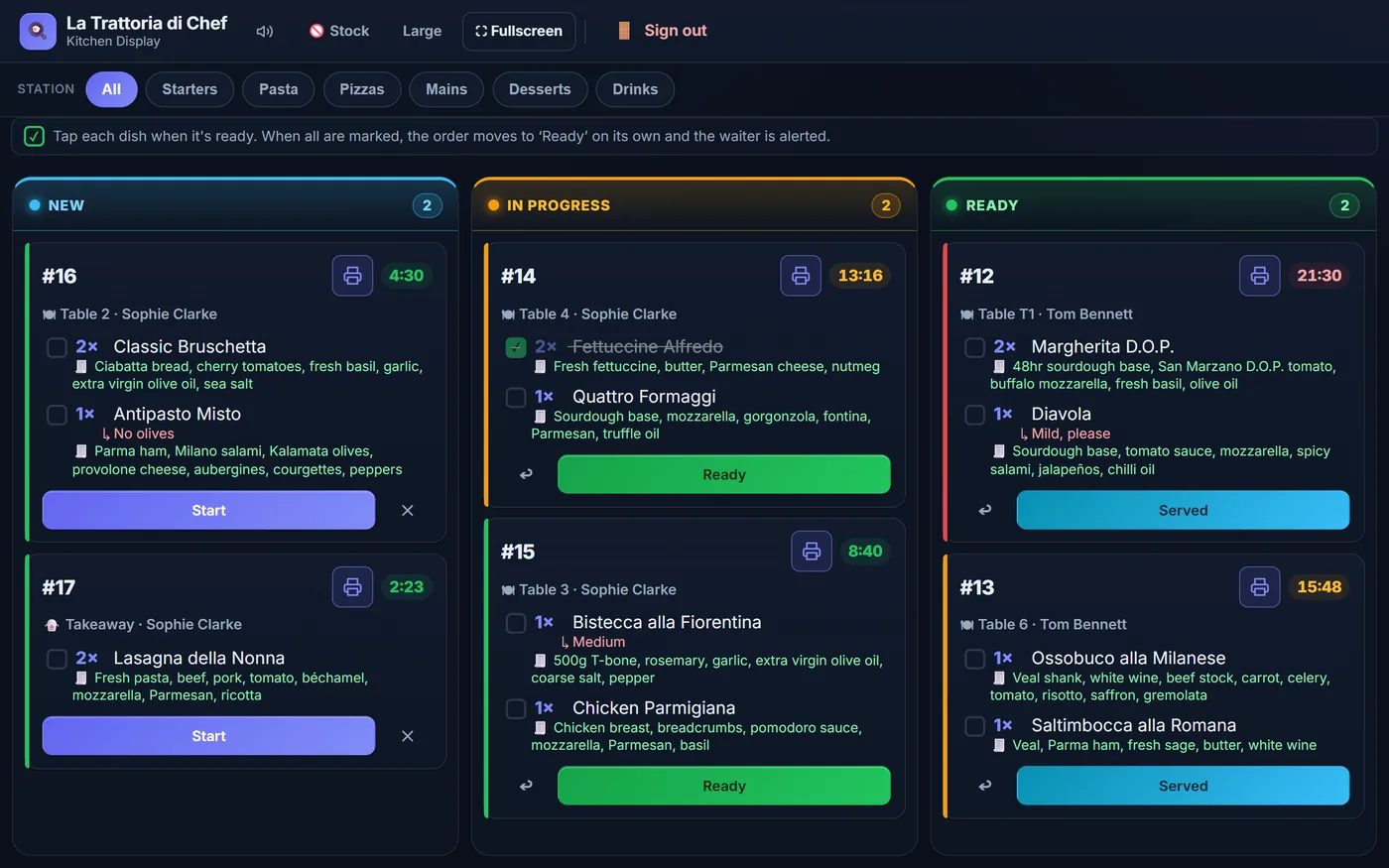
Each station ticks its own lines, and the order is called ready, with a beep on the server’s phone, only when every line is ticked. So use the ticks, not the ‘Ready’ button, which moves the whole order. To get drinks out before the food, send them as a round of their own, on the same tab.
There is no fee per screen. More on the kitchen display system, the order taking app and paper tickets versus a kitchen screen.
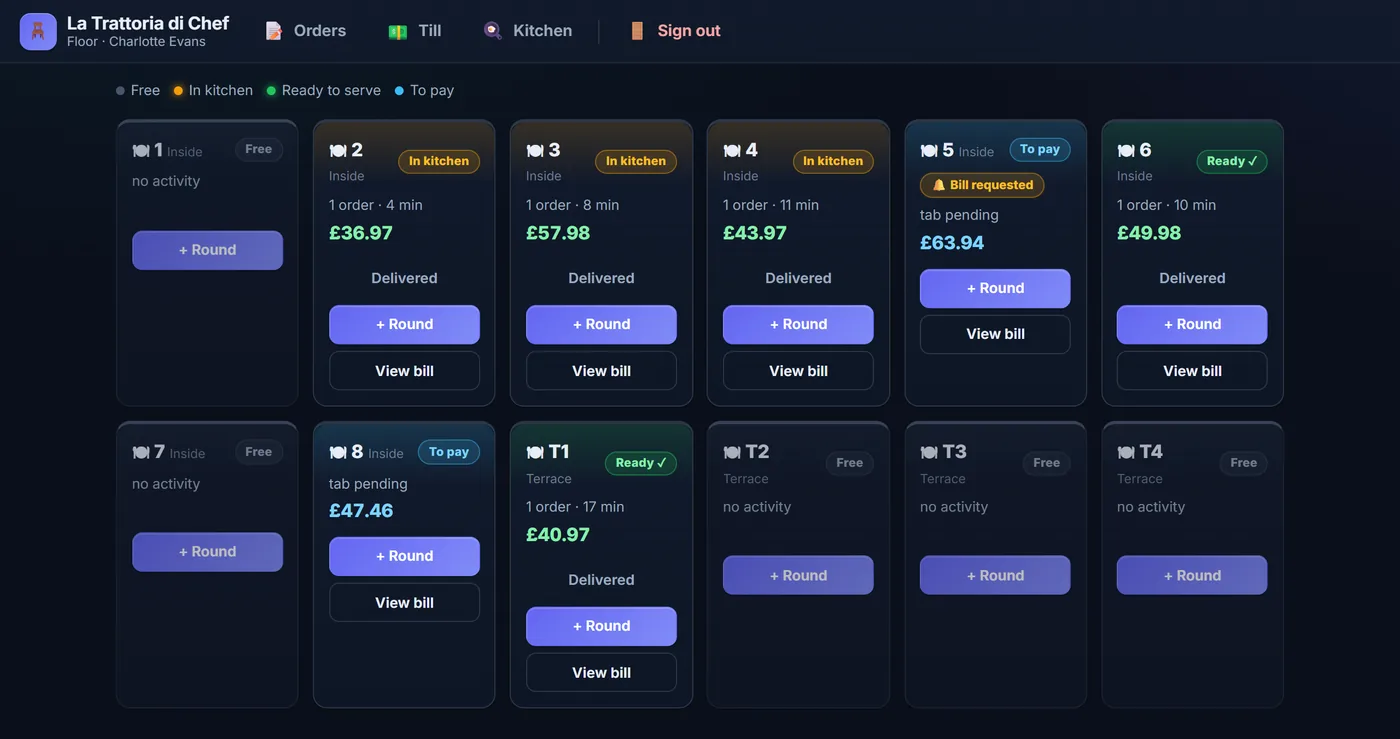
Name tables to suit the pub: ‘Table 12’, ‘Garden 4’, ‘Bar 3’. Every round sent to a table joins its tab, and the floor screen shows which tables are waiting, which are ready and which have a balance to pay.
| Garden 4, a table of four | Amount |
|---|---|
| Round 1: four pints of lager | £20.80 |
| Round 2: two burgers, fish and chips, steak and ale pie | £59.50 |
| Round 3: two pints, two glasses of white | £23.70 |
| The tab | £104.00 |
The till splits that bill equally (four ways is £26.00 each), by item (the one who had both glasses of white and the pie pays £28.30) or in part payments, each recorded as cash or card. The card goes through your own machine: the till cannot hold a card behind the bar. A drink paid for at the bar goes through ‘Quick sale’, with no tab.
Tips can be suggested on the bill and marked as voluntary, credited to the server or pooled, or switched off altogether. See the restaurant till system and how to cash up a till.
| What you pay for | With ElMenu |
|---|---|
| Professional: menu, screens, tabs and till | £29.99 + VAT a month (£35.99 with VAT) |
| More screens or more staff | Nothing more |
| Starter: the menu alone, up to 50 products | £14.99 + VAT a month (£17.99 with VAT) |
| Free trial of either | 14 days, no card needed |
A pub with a tablet behind the bar, one in the kitchen and six staff on their phones pays £29.99 + VAT a month, which is £359.88 + VAT a year, or £299.90 + VAT if paid annually, with no commission on sales and no lock-in. More on the pricing page and in our guide to QR code menu costs in the UK.
It is built around table service. If nearly all your trade is drinks rung up one at a time at the bar, a traditional bar till will be quicker.
FAQ
Short, direct answers to common questions.
No. Scanning the code shows guests the menu and nothing more. Your staff take the order at the table on their phones, and it goes to the bar and kitchen screens.
Yes. Each screen is set to show only the menu categories you choose, so drinks appear at the bar and food in the kitchen. There is no charge per screen.
No. Prices do not change by the time of day. You can schedule a deal for certain days of the week, or set a sale price by hand and remove it afterwards.
With ElMenu, £14.99 + VAT a month for the menu alone, or £29.99 + VAT a month with bar and kitchen screens, table tabs and a till, however many screens and staff you have.
Add your drinks and food and send a test round to the bar screen. 14 days free, no card needed.