Three ways to get an order to the kitchen
Most venues use one of these three, or a mix:
- Handwritten tickets. Servers write the order on a pad, tear off the top copy and take it to the kitchen, where it goes on the ticket rail.
- Printed tickets. The order is keyed into a till or EPOS system and a printer in the kitchen prints it.
- Kitchen display screen, or KDS (kitchen display system). The order appears on a screen, the kitchen marks its progress and front of house can see when it is ready.
What goes wrong with paper tickets
Paper is cheap and never crashes, but every ticket passes through several hands and something can get lost at each one:
- Illegible handwriting and home-made shorthand. "S/S" might mean side salad or sauce on the side, depending on who wrote it.
- Lost tickets. A ticket that slips behind the pass or gets wet is a table waiting without anyone knowing.
- Walking and shouting. Servers walk to the kitchen to drop off the ticket and walk back to ask whether it's ready, and the kitchen has to call "service!" for anything waiting on the pass. On a busy night, that is noise and lost time.
- No clock. Nobody knows how long each table has been waiting until a guest complains.
- Half-made changes. If a table changes a dish, someone has to find the right ticket and correct it by hand.
- No record. At the end of the night you don't know what sold most or when the kitchen was under most pressure, unless someone types it up.
Kitchen printers: better writing, same paper
Printing fixes handwriting and shorthand, because the order always comes out the same way, and it saves the walk to the kitchen. But the rest is still paper: tickets can still get lost or wet, they don't flag an order that is running late, and to know whether something is ready someone has to go and look. It is also one more piece of kit in the kitchen, with paper rolls to buy and a spot to find away from the heat and grease.
What changes with a kitchen display
With a screen, the order a server takes on their phone reaches the kitchen instantly. The kitchen moves it through its stages (new, in progress, ready) and front of house finds out without asking. Here is how the three options compare:
| Aspect | Handwritten | Printed | Screen |
|---|---|---|---|
| Handwriting and shorthand | Depends on who writes | Always the same | Always the same |
| Lost tickets | It happens | It happens | Stay on screen until marked |
| How long it has waited | Nobody knows | Only the printed time | A timer per order and a warning when late |
| Telling front of house | Shouting | Shouting | On the screen or the server's phone |
| If the internet drops | No change | Depends on the system | If cloud-based, new orders stop arriving |
| Record to review later | No | Depends on the system | Yes, if the system stores orders |
| What you need | Pads and pens | A printer, paper and a till system | A tablet or laptop and reliable Wi-Fi |
When paper is enough
If the person who takes the order is also the one who cooks it, if you only have a handful of tables, or if you can't guarantee reliable Wi-Fi in the kitchen, paper may still do the job. A screen pays off more the more orders are on at once and the more people move between the floor and the kitchen.
The kit you need for a kitchen display
- A screen in the kitchen. A tablet or laptop with a web browser will do. Where it goes matters more than the model: it must be readable from where you cook and not sit above the grill, the fryer or the sink.
- A sturdy mount or shelf at eye level, away from steam and splashes, with the charger plugged in for the whole shift.
- Phones for front of house, with a web browser.
- Reliable Wi-Fi in the kitchen and across the dining room. This matters most: test the signal in the kitchen during a busy service and at the table furthest from the router, and fix any dead spots before you start.
- Optionally, a printer, if you still want some tickets on paper, such as takeaway orders.
What happens if the internet drops
A cloud-based kitchen display needs a connection: if it drops, new orders won't arrive until it comes back. That is no reason to stay on paper, but it is a reason to have a fallback:
- Always keep a pad of tickets and a pen on the floor and in the kitchen.
- Agree a simple rule: if the screen shows there is no connection, everyone goes back to paper until it returns.
- Keep a phone with mobile data handy: using it as a hotspot can tide you over until the Wi-Fi is back.
- Once you are back online, enter whatever was taken on paper so you can charge the full bill.
ElMenu works this way: it needs the internet. If the connection drops, the screen shows "No connection" and recovers on its own once the signal is back.
How to switch from paper without disrupting service
- Load your full menu with names the kitchen recognises, and check the prices.
- Test the connection in the kitchen and across the dining room before day one.
- Pick a quiet shift to start, such as a weekday lunch. Never your busiest night.
- Keep the pads handy on that first shift: if anything goes wrong, you go back to paper, no debate.
- Train each role on its own part: servers on taking orders and notes ("no onion"), the kitchen on marking dishes ready, the till on taking payment.
- Review at the end of the shift what was awkward and adjust dish names, frequent notes or where the screen sits.
- Add one shift at a time until paper is only your fallback.
The ElMenu kitchen display
With the ElMenu kitchen display system, included in the Professional and Premium plans, servers take the order on their phone with the waiter ordering app, with notes for each dish, and the ticket appears instantly on the kitchen screen in three columns: new, in progress and ready. Every order has its own timer and changes colour once it passes the number of minutes you set as late. The kitchen marks each dish ready and the server gets an alert on their phone. If you need paper, any ticket can be printed from the browser.
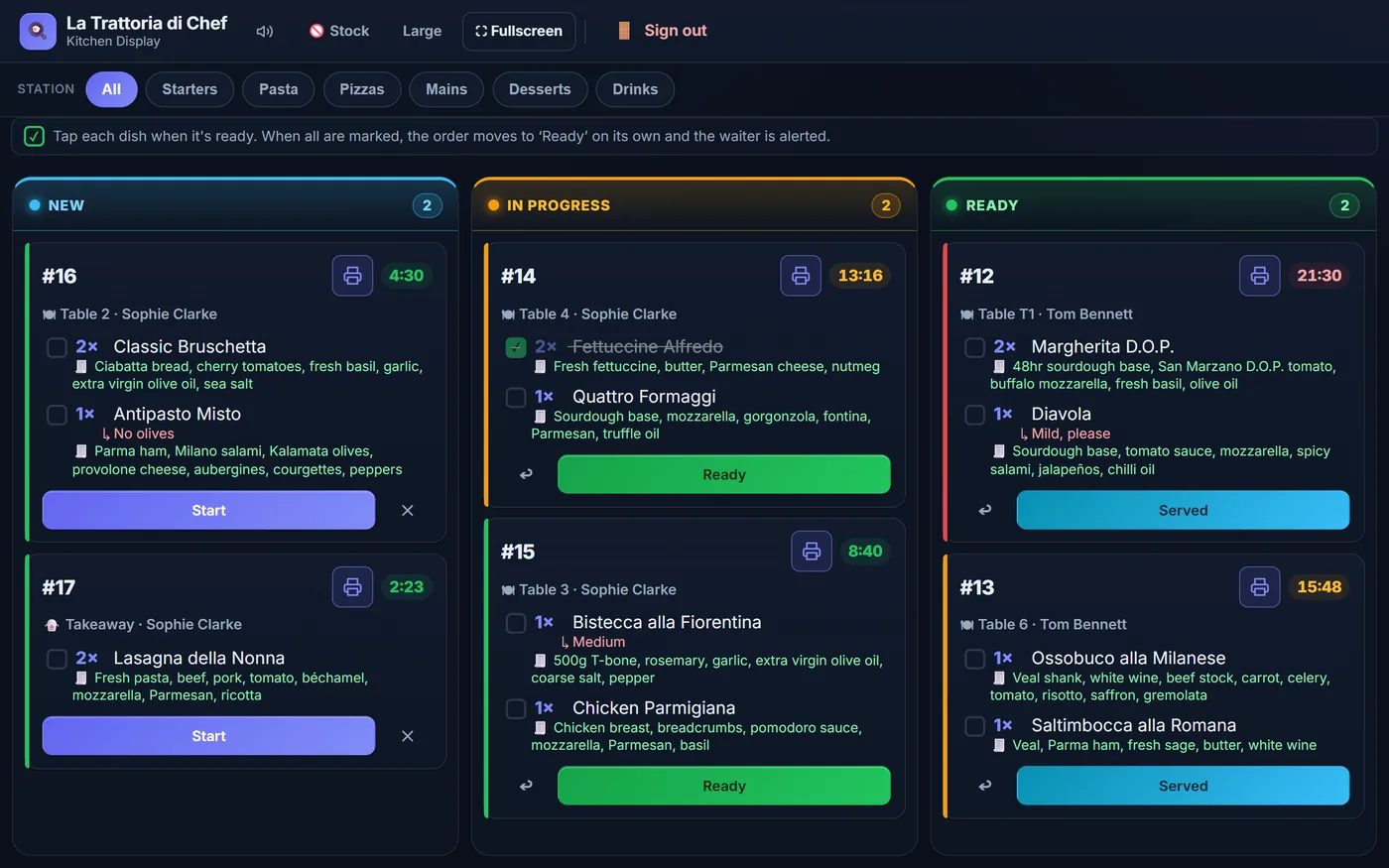
It runs in the web browser of the devices you already have, with no charge per screen or per user, and it connects to the ElMenu till so you can take payment for the table. It needs the internet: keep your pad as a fallback.