Nothing to download
It opens from a link in the phone’s browser.
ElMenu’s order taking app is a web page, not a download. Each of your waiting staff opens the team link on their own phone, signs in with a six-digit PIN and takes orders at the table; the order reaches the kitchen display in seconds and the phone alerts them when it is ready. It is part of the Professional plan, £29.99 + VAT a month (£35.99 with VAT), with no fee per user or screen. It needs an internet connection to work, and it is not a card reader.
Professional plan: £29.99 + VAT a month · 14 days free, no card needed · no lock-in
Quick overview
For venues where staff take the order at the table.
It opens from a link in the phone’s browser.
Six digits and a role. Remove someone and their access stops there and then.
Two servers or twenty on the same plan.
It is the staff side of ElMenu: a few pages for the people working the shift (order taking, the floor, the kitchen display and the till) that open from one team link, which you copy from your dashboard. There is no app store, no account for each person to create and no update to install before a busy Friday.
Your menu is already in it: the order screen lists the same dishes and prices as your QR code menu. A new starter needs two things, the link and a PIN.
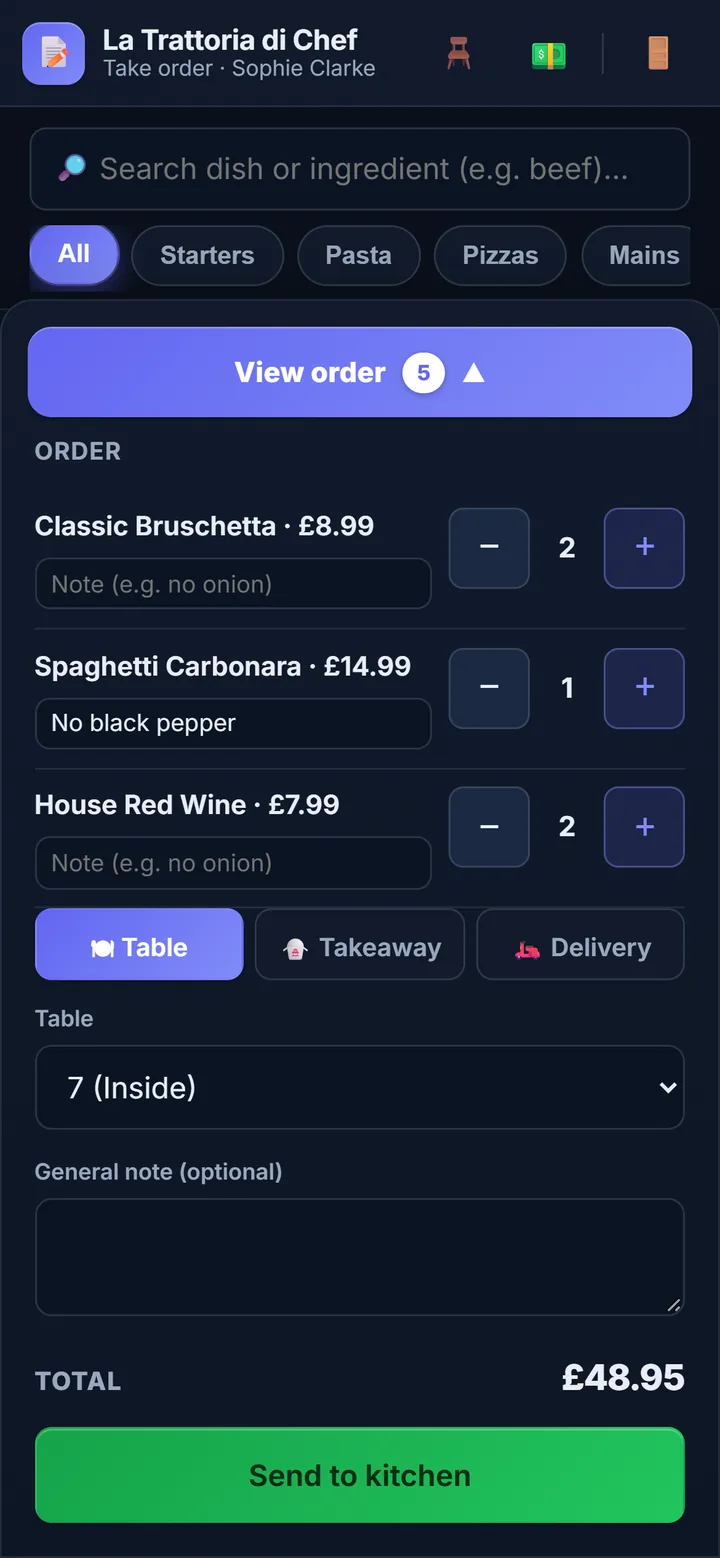
For another round, the server opens Floor and taps ‘+ Round’ on the table; it joins the same bill. The floor screen also shows each table’s status and balance.
If a dish sells out while the order is being keyed, it is left off and the phone names it. If the signal drops as they send, tapping again does not create a second order.
What the server typed arrives as one ticket: order number, table, server’s name, a running timer and each dish with its quantity and note. The kitchen taps each dish as it is plated; when the last is ticked, the order moves to ‘Ready’ by itself.
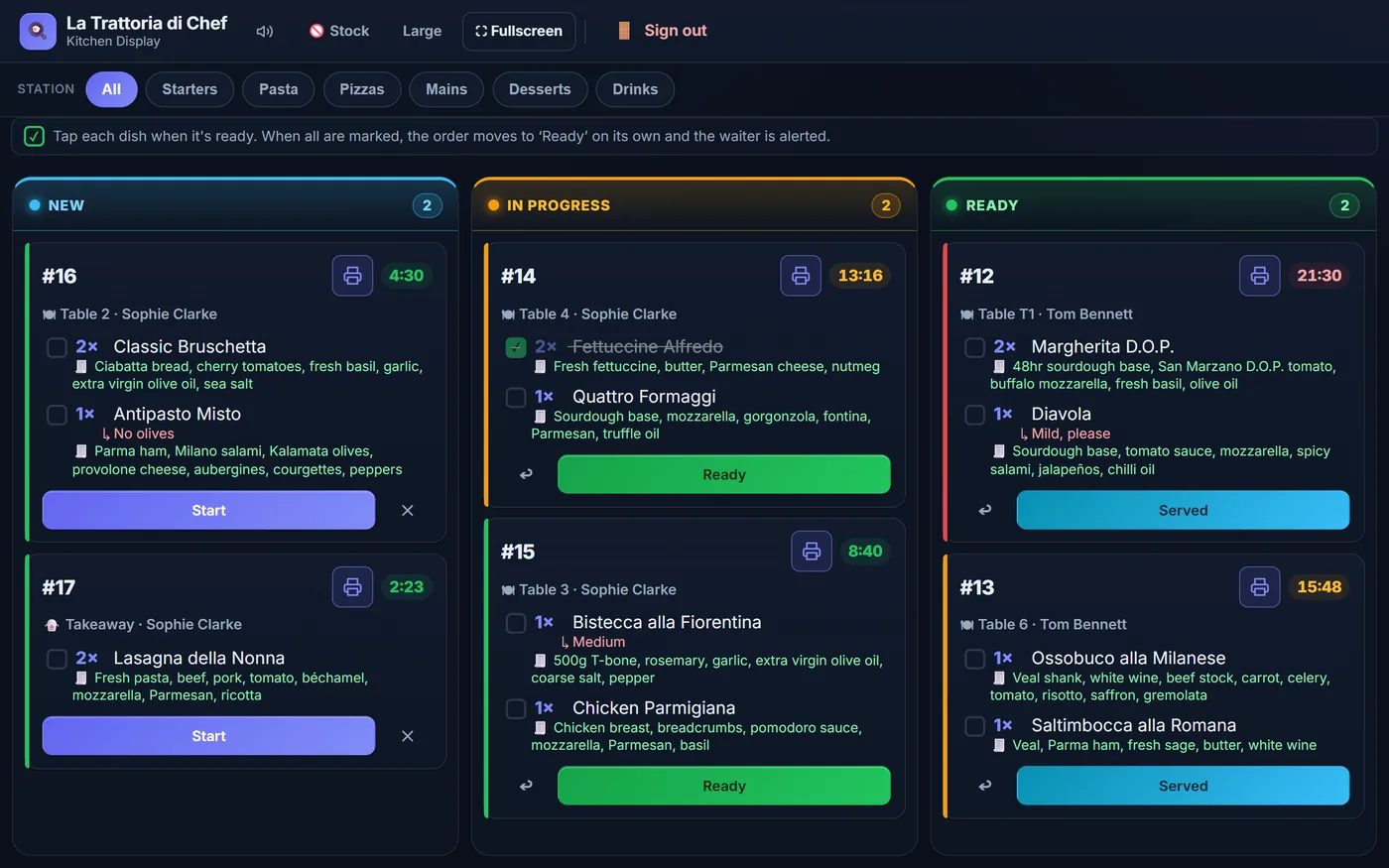
On the server’s phone a green Ready to serve bar appears with the order number and table, and the phone beeps. If the kitchen cancels an order, the phone shows Cancelled in the kitchen with the reason.
Alerts arrive while the app is open on screen: as a web page it cannot wake a locked phone. Ask servers to keep it open, and to tap the screen once after signing in so the sound can play.
No screen in the kitchen? Servers mark rounds ‘Delivered’ from the floor screen instead: see paper tickets or a kitchen display.
Under Staff in the dashboard you add each person with a name, a role and a six-digit PIN. No two people in a venue can share a PIN, so every order and payment carries a name.
| Role | Opens on | What they can do |
|---|---|---|
| Waiter | Order taking | Takes orders, adds rounds, requests the bill. By default also runs the till |
| Kitchen | Kitchen display | Starts, finishes and cancels tickets; marks dishes sold out. No orders, no till |
| Cashier | Till | Takes payment, voids payments, cashes up. Can also take orders |
| Manager | A menu of all four screens | Everything, plus closing a table without charging |
Can a waiter take payment? Yes, unless you turn it off. The setting is ‘Allow waiters to run the till’, and while it is on they can also void payments and close the till, as a cashier can. Switch it off and the money goes through whoever is on the till.
Any phone, tablet or laptop with an up-to-date browser, the venue’s or the server’s own. To have it open like an app, add the team link to the home screen once:
The icon carries your venue’s name and opens full screen. The Wi-Fi matters more than the phone: it has to reach the far tables, the kitchen and the garden.
Order taking is part of Professional, along with the kitchen display, the floor plan, the till and the QR code menu your guests see. It is not in Starter.
| What you pay for | With ElMenu |
|---|---|
| Professional plan | £29.99 + VAT a month (£35.99 with VAT) |
| Each member of staff, phone or screen | Nothing more |
| Free trial | 14 days, no card needed; nothing charged automatically |
So six servers, a tablet in the kitchen and one on the till cost £29.99 + VAT a month, and four more staff for December cost nothing more. There is no commission on sales. See pricing and features.
FAQ
Short, direct answers to common questions.
No. The app is a link: staff open it in the browser on their phone and key in their PIN. It can sit on the home screen like an app, but nothing comes from an app store.
Yes. It works in the browser of any up-to-date iPhone or Android phone, their own or the venue’s. Each person signs in with their own PIN.
By default, yes: waiters can take payment, void payments and cash up. You can switch that off so that only cashiers and managers handle the till. The card itself goes through your own card machine.
With ElMenu it is part of the Professional plan: £29.99 + VAT a month (£35.99 with VAT) for the whole venue, with no charge per user or per device. You can try it free for 14 days with no card.
Add a few dishes and a PIN for yourself, and send a test order. 14 days free, no card needed.