Made from your live menu
Nothing is typed twice, and you don’t need a designer every time a price goes up.
ElMenu makes your paper menu from the same digital menu guests see when they scan your QR code: pick one of 9 styles and one of 8 formats, and your browser prints it with today’s prices. Change a dish or a price later and your dashboard tells you the printed copy is out of date. Bistro and all 8 formats come with every plan; all 9 styles are on Professional and Premium.
From £14.99 + VAT a month · 14 days free, no card needed · no lock-in
Quick overview
Pick a style, a format and what to include.
Nothing is typed twice, and you don’t need a designer every time a price goes up.
Add, change or remove dishes after printing and the dashboard counts them for you.
Your browser prints it: straight to your own printer, or as a PDF for a print shop.
You don’t start from a blank template: it fills itself from your digital menu.
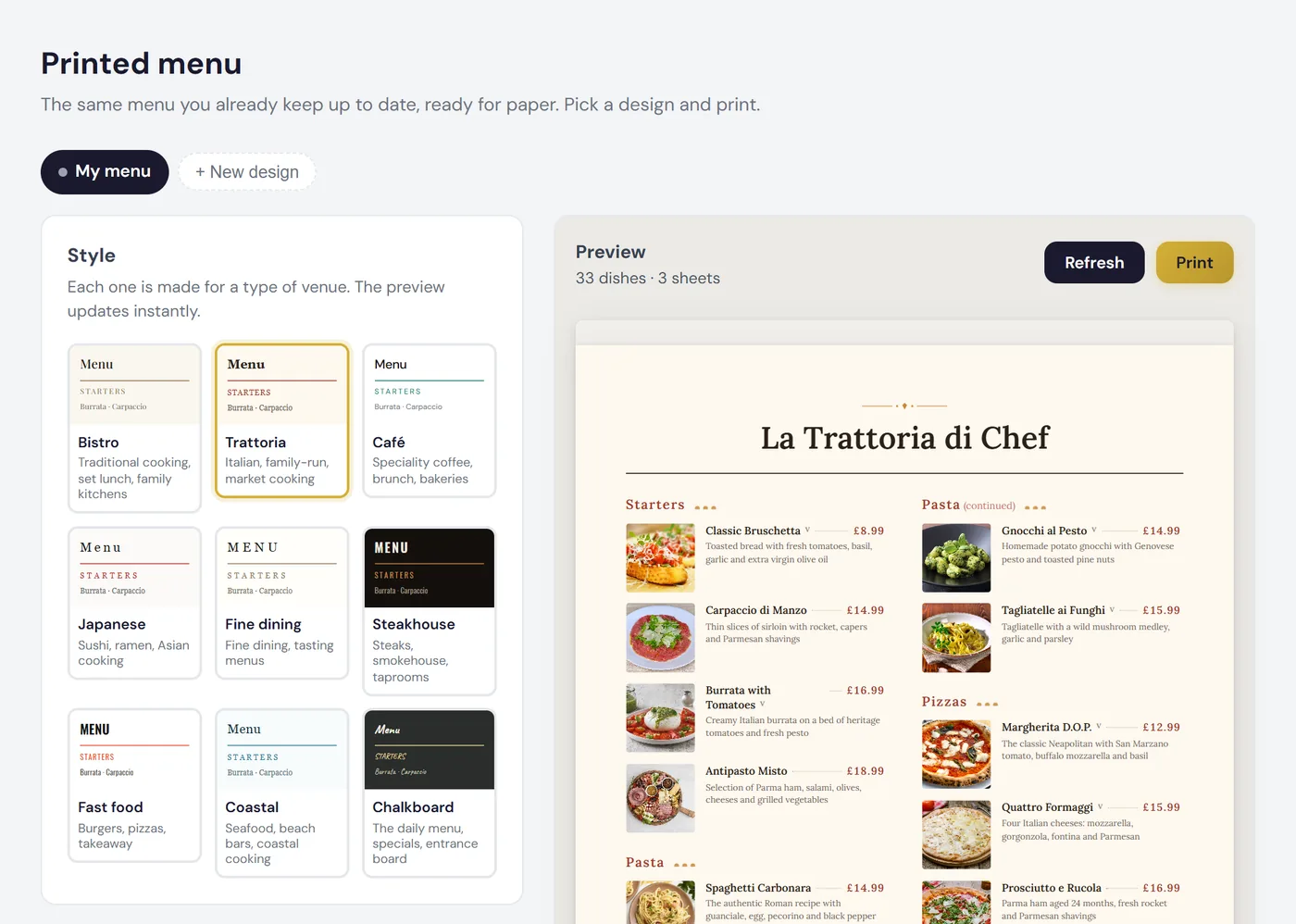
Before you print, the dashboard flags dishes with no description, photo or allergens. You can save up to 12 designs, such as ‘A4 tables’ and ‘Daily menu’. Reworking the menu? Decide first which dishes to feature with our guide to menu engineering.
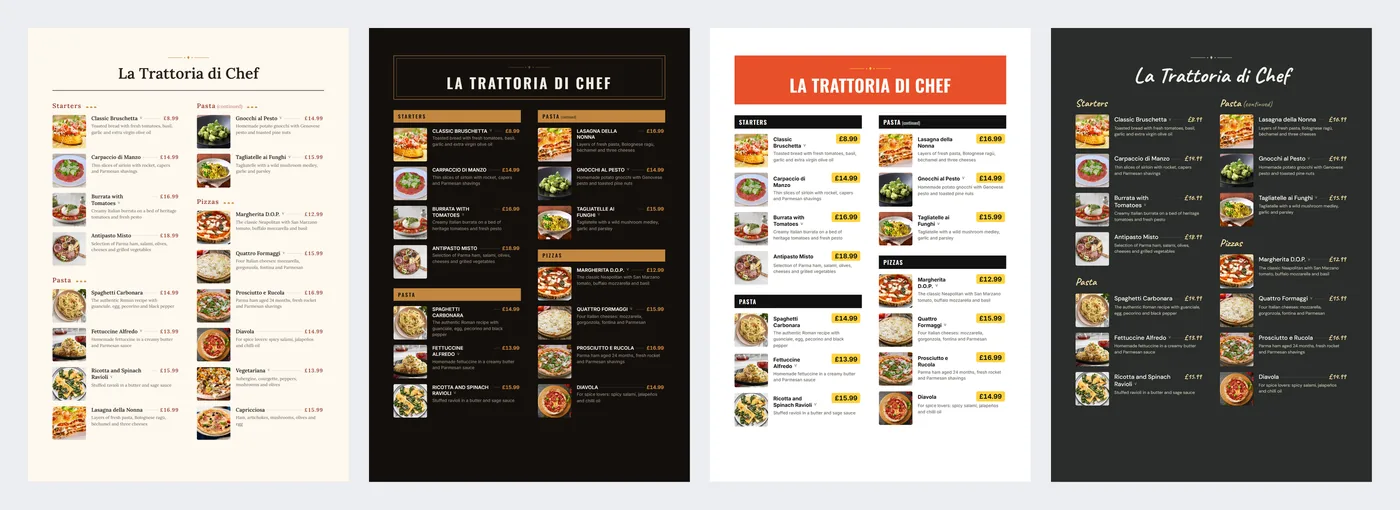
Each style is a complete design for a type of venue. Bistro comes with every plan; the other eight are on Professional and Premium (Starter can preview them, not print them).
| Style | Made for |
|---|---|
| Bistro | Traditional cooking, set lunch, family kitchens |
| Trattoria | Italian, family-run, market cooking |
| Café | Speciality coffee, brunch, bakeries |
| Japanese | Sushi, ramen, Asian cooking |
| Fine dining | Tasting menus; prices without the £ sign |
| Steakhouse | Steaks, smokehouse, taprooms; dark background |
| Fast food | Burgers, pizzas, takeaway; colour fills |
| Coastal | Seafood and coastal cooking |
| Chalkboard | Daily menu and specials; handwritten type, dark background |
Steakhouse, Fast food and Chalkboard use colour backgrounds: when printing, turn on ‘Background graphics’ under ‘More settings’, or the paper comes out blank. ‘Ink saving’ prints them in black and white.
| Format | Size | Best for |
|---|---|---|
| A4 menu | 210 × 297 mm | The full menu, in two columns |
| Letter menu | 216 × 279 mm | US Letter office size |
| A5 menu | 148 × 210 mm | A separate drinks or dessert menu |
| A5 daily menu | 148 × 210 mm | Reprinted every morning |
| A3 placemat | 420 × 297 mm | Menu and placemat, in three columns |
| A3 poster | 297 × 420 mm | Wall or doorway, larger type |
| A4 folded | 297 × 210 mm | Landscape A4, folded in half |
| Pocket card | 99 × 210 mm (DL) | To take away, with the QR code |
All 8 formats come with every plan. No dish is split across two sheets, and a section that runs over repeats its heading with ‘(continued)’.
When you press Print, ElMenu records the date and how many dishes that design had. Add, change or remove dishes afterwards (a price rise, say) and the dashboard shows a warning such as:
‘Since you printed this menu (3/11/2026) there are 2 new dishes and 5 changed dishes. What is on the tables no longer says the same as your digital menu.’
Each saved design carries a coloured dot: green if it is up to date, amber if something has changed, grey if not printed yet.
The cover goes in front, on its own sheet: logo, description, contact details, social media, opening hours and a large QR code inviting guests to see the menu on their phone. The back sheet closes with a sign-off, the QR code and your guest Wi-Fi password. It all comes from your record, and empty fields are skipped.
| Plan | Per month | Printed menu |
|---|---|---|
| Starter | £14.99 + VAT | Bistro and all 8 formats, with cover, back sheet and out-of-date warning |
| Professional | £29.99 + VAT | All 9 styles, plus everything else |
| Premium | £39.99 + VAT | All 9 styles, plus everything else |
Starter and Professional come with a 14-day free trial, no card needed (trial Professional and you get all 9 styles), and nothing is charged automatically when it ends. More on pricing and features. And if you run a café or a pub, see the QR code menu for cafés and for pubs.
FAQ
Short, direct answers to common questions.
No. Pick a style and a format; typography, margins and columns are already worked out. You only keep dishes and prices current, the same ones as your digital menu.
No. Reprint as often as you like at no extra charge: you only pay for paper and ink.
What you printed is yours. But its QR code leads to your digital menu, which pauses when the subscription ends: anyone scanning sees ‘Menu unavailable’ until you reactivate. Prefer paper that doesn’t depend on that? Print it without the QR code.
You can show it as it is with PDF menu mode, on every plan. Bear in mind a PDF menu has no translation, search or sold-out dishes.
Try it free for 14 days, no card needed: load your menu, pick a format and print in the Bistro style. For all 9 styles, trial Professional.