Take payment their way
In full, equal split, by item or part payments, each with its own payment method.
ElMenu’s till takes payment for each table (in full, split equally between guests, by item or as part payments), records the payment method and the tip, and at the end of the shift compares what you expected with what you counted, for cash, card and transfers. It works alongside the card machine you already have: take the card there as usual and record ‘Card’ on the till. It doesn’t process card payments itself. It is built for small restaurants, cafés and pubs in the UK and comes with the Professional plan at £29.99 + VAT a month (£35.99 with VAT), linked to the kitchen display system.
Professional plan: £29.99 + VAT a month · 14 days free, no card needed · no lock-in
Quick overview
It runs in the browser on a tablet, laptop or phone, over an internet connection.
In full, equal split, by item or part payments, each with its own payment method.
Credited to the server who looked after the table or pooled, with every payout logged.
Opening float, expected against counted and the difference for cash, card and transfers.
A till system, often called EPOS (electronic point of sale), is where a restaurant rings up orders, takes payment and cashes up. A full EPOS usually comes with its own card reader, stock control and hardware. ElMenu’s till covers the service side: table bills, split payments, tips and cash-up, in the browser, alongside the card machine you already have.
On the till you open the table’s bill, with every round on it, and choose a mode:
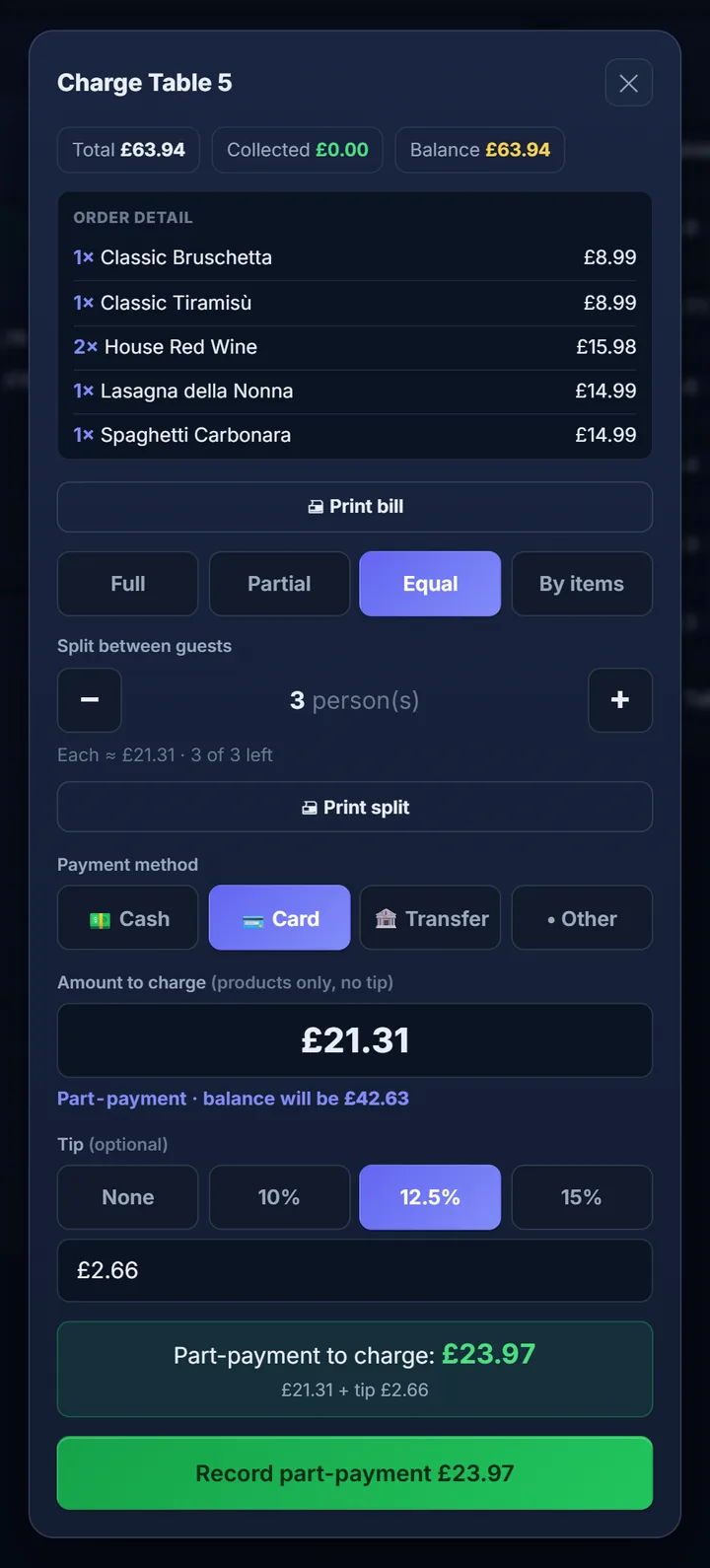
| Mode | What it’s for |
|---|---|
| Full | The whole bill in one payment. |
| Equal | Split between guests: choose how many and it works out each share. |
| By items | Each guest pays for their own: tick their items and it works out the amount. |
| Partial | A part payment of any amount; the rest stays on the table. |
Each payment has its own method, so a table can pay part in cash and part by card. For cash, enter what you were handed and the till works out the change. Counter sales with no ticket go through ‘Quick sale’.
Example: table 6 comes to £84.00 and three friends split it equally: £28.00 each, plus a £3.50 suggested tip if they choose to add it, so £31.50 per person.
ElMenu works alongside any card machine because it isn’t connected to one: it doesn’t process card payments. The guest pays on your terminal as usual and you record ‘Card’ on the till; the other methods are cash, transfer and other. At cash-up you enter the batch total from the card machine and the till tells you whether it matches what it recorded.
When the table asks for the bill, you print it with the items from every round and, if part has already been paid, what was paid and the balance, plus a ‘Suggested tip (12.5%)’ line, with the note ‘The tip is suggested and voluntary’. If the table is splitting, the bill also shows the amount per guest.
You decide how tips work in your venue:
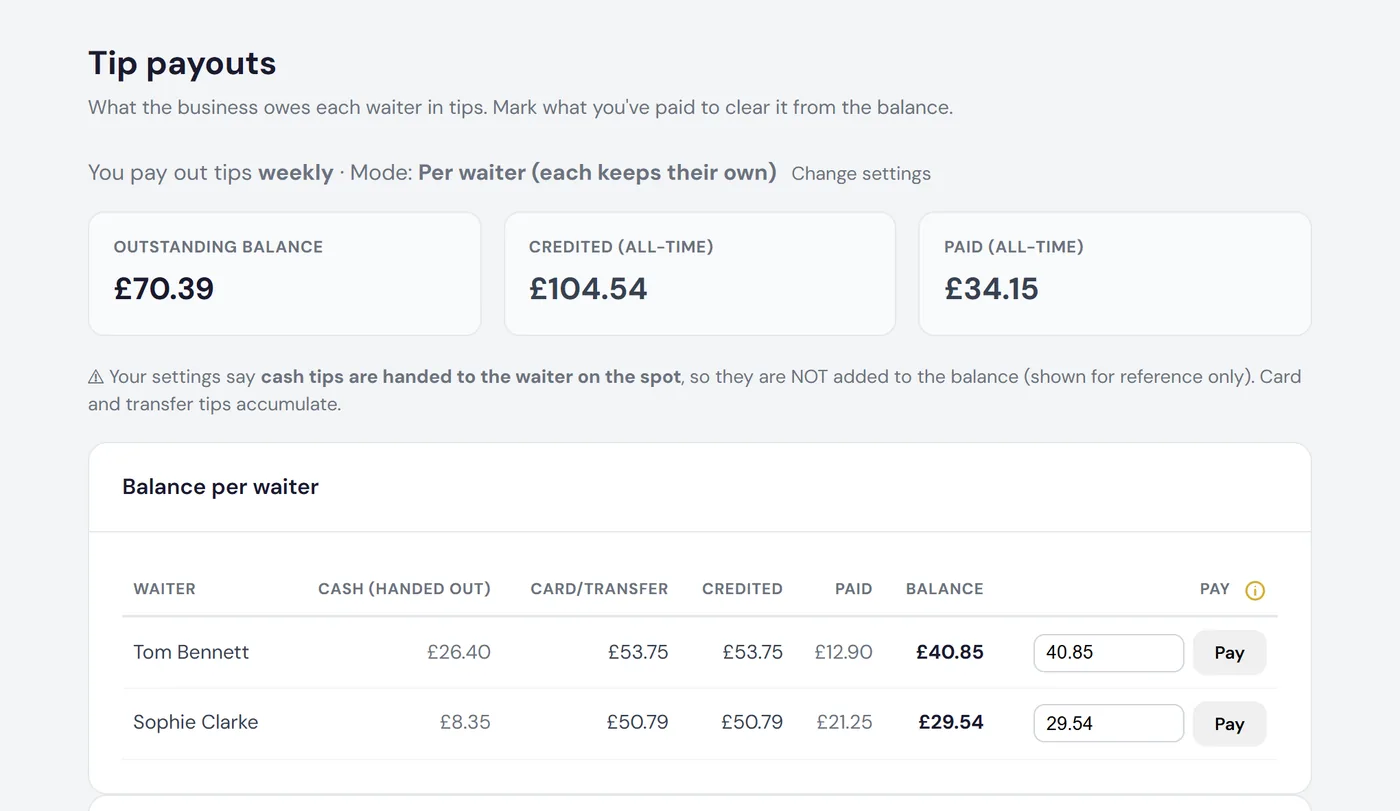
The ‘Tip payouts’ page shows what you owe each server, what you’ve paid and the balance. By default, cash tips are handed to the server on the spot and stay out of that balance: card and transfer tips are what build up. Mark what you hand over, even part of it; you can never pay out more than the balance. Every payout is logged and can be undone if you make a mistake.
You also choose whether cash tips stay in the drawer to be paid out later or go to the server there and then.
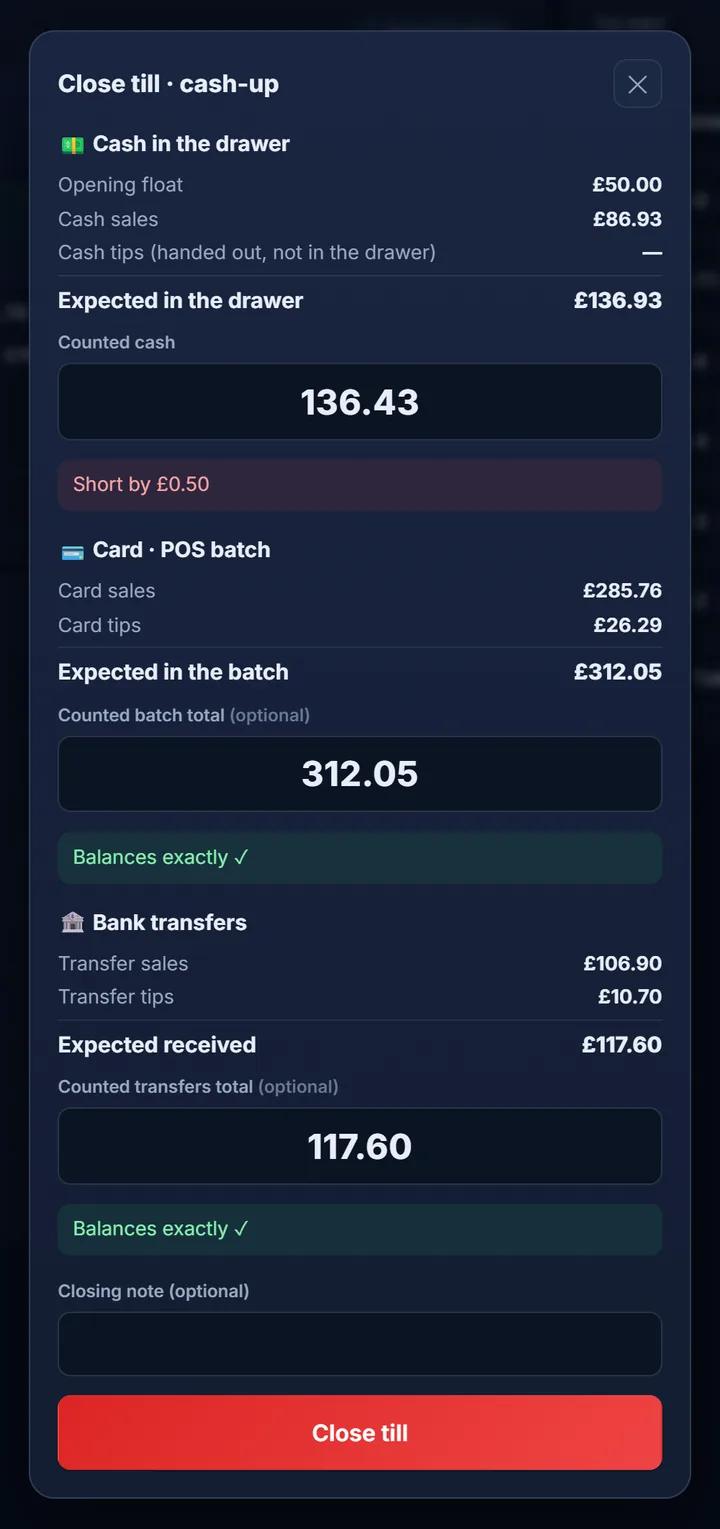
Each shift starts with an opening float. When you close the till, it shows what should be there and the cashier enters what they counted:
| Example cash-up | Amount |
|---|---|
| Opening float | £150.00 |
| Cash sales | £640.00 |
| Expected in the drawer | £790.00 |
| Counted cash | £785.00 |
| Result | Short by £5.00 |
If cash tips stay in the drawer, they are added to the expected figure. Card is checked against your machine’s batch total and transfers against what you received (these two checks can be switched off; cash is always counted). Once a shift is closed its payments can’t be voided, and the cash-up history downloads as CSV.
For a step-by-step walkthrough, including what to do when it doesn’t balance, read how to cash up a restaurant till.
The audit log records every order as it comes in, every order marked ready, served or cancelled, every payment and void, and every till opening or closing, with who did it and when, and it can’t be edited. A voided payment stays visible, marked as voided.
In the reports you pick a day or a date range:
Managers and cashiers, always. Servers can too unless you turn it off, in which case they only take orders and look after tables, and the money goes through one central till. Bear in mind that servers who can take payment can also void payments and close the till. They take the order on their own phone with the waiter ordering app, which is not installed from a store. Running a pub? See the QR code menu for pubs, with the bar and the kitchen on separate screens.
It suits a small restaurant, café or pub that already has a card machine and wants table service, split bills and tip tracking without buying a dedicated till terminal. It isn’t the right fit if you need to:
The till comes with the Professional plan (£29.99 + VAT a month, £35.99 inc. VAT) and with Premium, together with the kitchen display, floor plan, tip payouts and reports. There’s no per-user or per-screen fee and no commission on sales. The free trial lasts 14 days with no card needed, and nothing is charged automatically when it ends. Compare plans on our pricing page and see all the features.
FAQ
Short, direct answers to common questions.
Yes: equally (choose how many guests) or by item (each pays for their own), and each payment can use a different method.
Alongside it, not connected to it. Take the card on your machine as usual, record ‘Card’ on the till, and at cash-up compare the machine’s batch total with the till.
No. The bill marks it as suggested and voluntary, and the till always has a ‘None’ button for no tip. You can also switch tips off altogether.
Yes, while the shift is open. It stays in the audit log marked as voided, with who did it. Once the till is closed, it can’t be voided.
The till doesn’t work offline. Take payment on your card machine or in cash as usual and record those payments in ElMenu once you’re back online.
Set up a Professional account and run a test shift: open the till, split a table’s bill and cash up. 14 days free, no card needed.