Your QR code menu, always up to date on your guests' phones
ElMenu is the QR code menu for restaurants, cafés and pubs in the UK: guests see it the moment they scan, with nothing to install. From £14.99 + VAT a month; with order taking, a kitchen display and a till, £29.99 + VAT, with no commission and no per-screen fee.
14 days free, no card needed · no lock-in
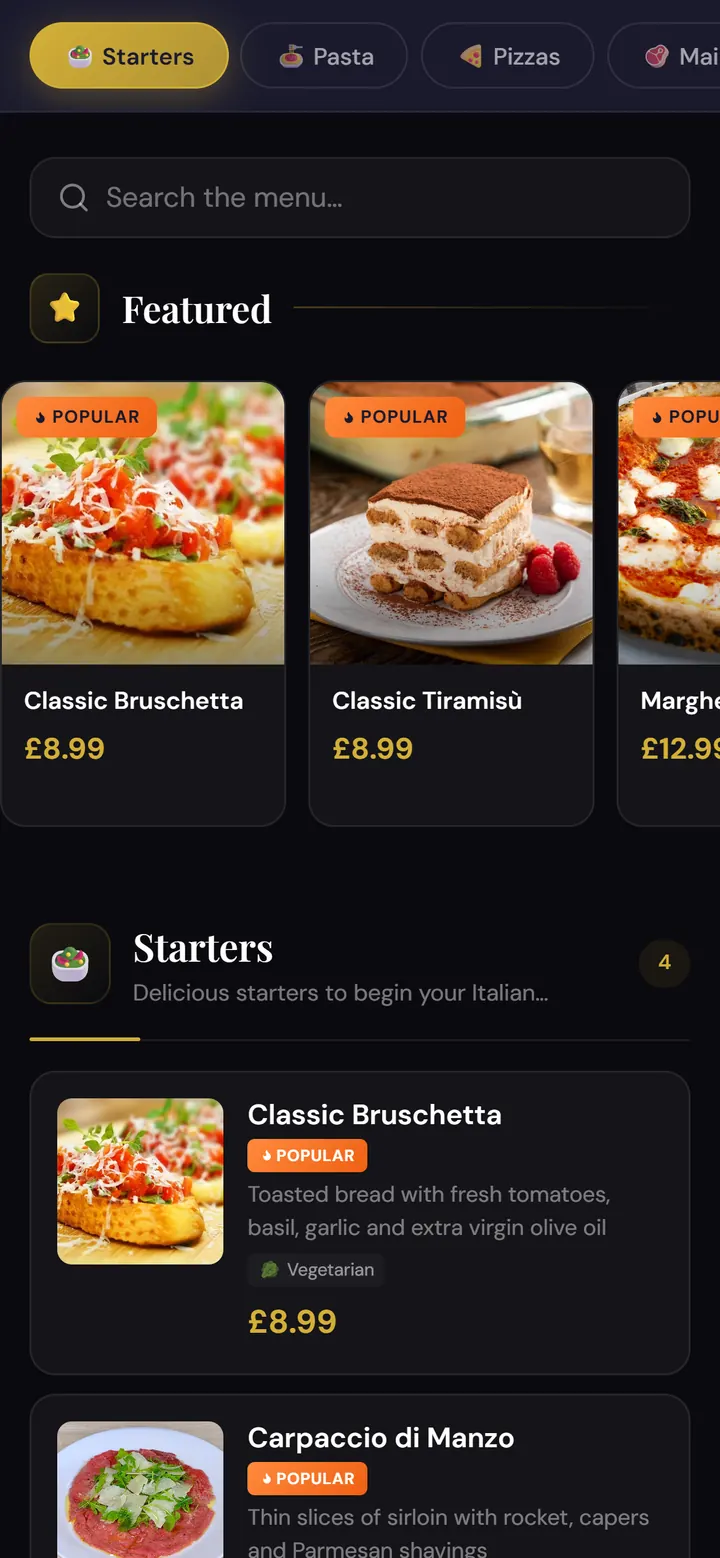
Why switch to a digital menu?
Your customers already have their phone in hand when they sit down — put the menu there
Save on printing
Stop reprinting your menu every time you change a price: on the phone you change it free and instantly, and you reprint on paper only when you want to.
Always up to date
Dish sold out? New price? Daily special? Make the change in 1 click and every customer sees it immediately.
Professional image
An elegant digital menu with photos of your dishes creates a first impression that makes a difference.
Eco-friendly & modern
You print when you decide to, not every time a price changes: far less paper in the bin, and a modern look for your business.
Everything your menu needs
What your menu can do
Custom QR Code
Generate unique QR codes for your restaurant. Your customers scan and view the menu instantly.
Instant Updates
Change prices, add dishes, or mark items as sold out. Changes are reflected immediately.
Elegant Designs
Choose from multiple themes and customise colours to match your brand.
Photos of Your Dishes
Upload several photos per dish with a swipeable gallery: guests see what they are ordering before they order it.
Visit Statistics
See how many people view your menu each day. On Professional, also which dishes get looked at most and which QR code is scanned most.
Labels & Ingredients
Mark items as vegetarian, vegan, gluten-free, or spicy. Display ingredients and allergens.
Ready for Google
Your dishes and prices are published as text with menu data, so Google can read them.
Multi-language Menu
Switch on automatic translation, pick the languages and international guests switch your menu to their language with one tap: up to 12 languages.
Your Menu on Paper Too
The same menu, ready to print in 8 formats: the Bistro style on every plan, all 9 styles on Professional and Premium. And we tell you when the printed one goes stale.
More than your menu: your kitchen and your till too
Orders, kitchen and till in one place, on the devices you already have. ElMenu doesn’t take card payments: you use it alongside your own card machine.
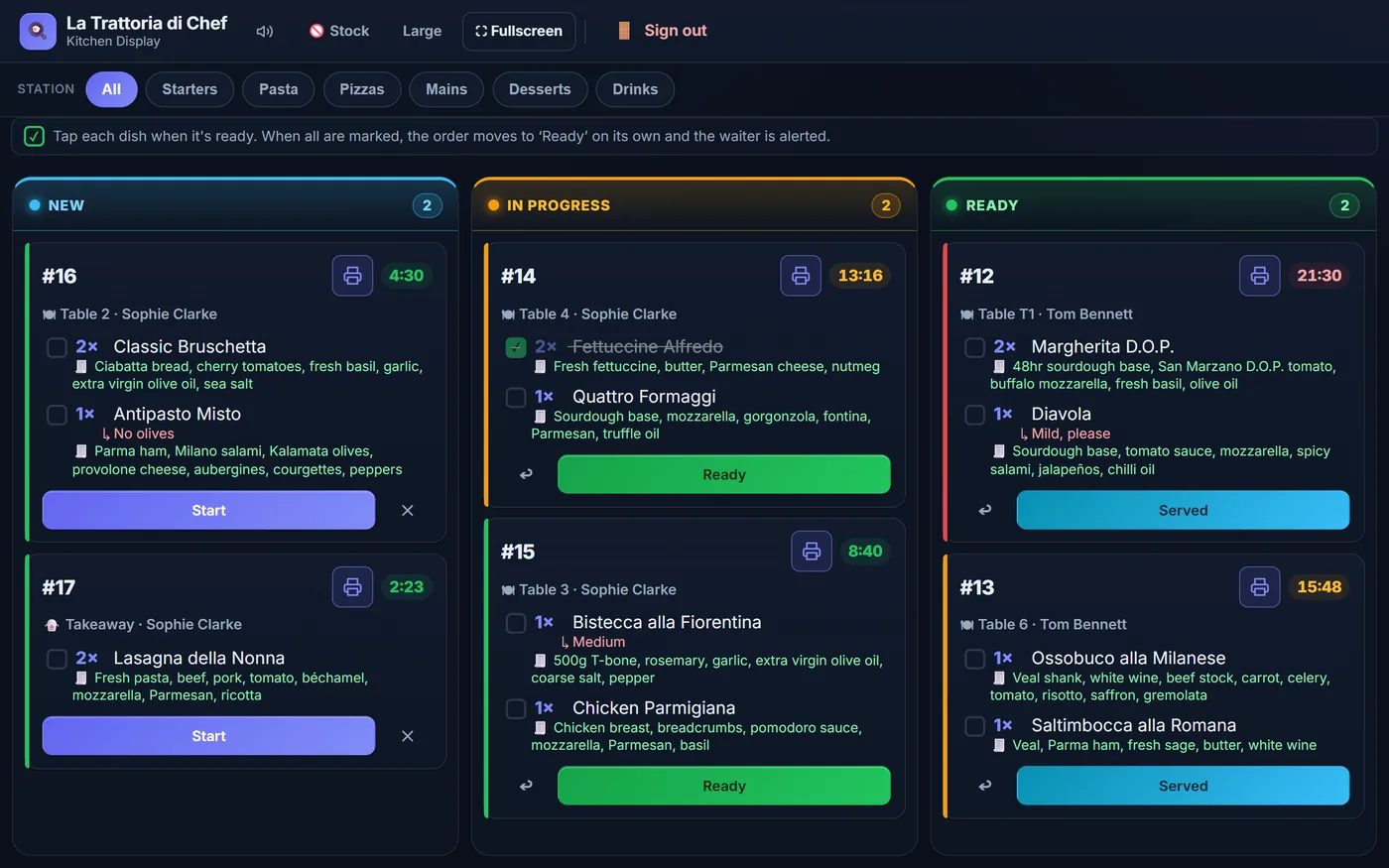
Kitchen Display (KDS)
Orders appear on a kitchen screen in real time: mark preparing, ready and served.
Till / POS
Payments, tips and a cash-up for every shift, with printable bills.
Tables & staff PINs
Each server or cashier signs in with their own PIN; you decide who can take payment.
Verifiable activity log
Every payment, void and till opening or closing is logged, so you can check it against the cash in the drawer.
Reports by date
Sales, best-selling dishes and each server’s figures, by day or date range.
Already have your menu as a PDF?
No problem: upload it to ElMenu and your customers will see it on your ElMenu page, with no downloads. You can upload several menus (food, drinks, desserts), with your restaurant's branding; portrait pages with large text read best on a phone. Available on every plan. How to put a PDF menu on a QR code.
Try 14 days freeA menu that matches your brand
Pick one of 14 themes (13 dark and one light, Snow) and match the primary and secondary colours to your brand. Here are a few:
Who is ElMenu for?
If your business has a menu, ElMenu fits: from a corner café to a restaurant with hundreds of dishes
QR code menu for cafés · QR code menu for pubs · Waiter ordering app
How does it work?
Publish your menu the same day, in 4 steps. How to make a QR code menu, step by step
Sign Up
Create your account in less than 1 minute. 14-day free trial included.
Customise Your Menu
Choose colours, upload your logo, and set up your categories.
Add Your Dishes
Upload photos, prices, descriptions, and ingredients.
Put the QR code on your tables
Download your QR code, print it and put it where your guests sit.
Print-ready signage, in several formats
Choose from 8 templates with your QR code, in the colours you like: table tents, a poster, cards, stickers, a door hanger and flyers. Depending on the template, they carry your venue’s name, a line of instruction and your Wi-Fi details. Download them as PDFs, ready to print. How big the QR code should be on a table.
- 8 templates, ready to print
- With your QR code and, depending on the template, your venue’s name and a line of instruction
- Your Wi-Fi details, on the table tent, the poster and the door hanger
- Customisable colours · PDF download
Guests who prefer a paper menu? Print it from the same place
You do not have to choose between the phone and the paper. It is the same menu you already keep up to date, ready to print from your browser with today's prices: pick the style and the format, and that is it. No designer, and not one dish typed twice. See the printable menu maker: 9 styles, 8 formats.
- One menu, not two. The paper comes from your digital menu, so you keep one and both say the same.
- We tell you when it goes stale. "Since you printed it there are 4 new dishes and 39 changed dishes."
- Reprint whenever you like, always with today's prices and at no extra cost.
- With your QR on the cover: anyone who prefers their phone scans it off the same menu, photos and language included.
- 9 styles and 8 formats. Built around the kind of place you run: bistro, trattoria, Japanese, grill, chalkboard… Bistro on every plan; all 9 on Professional and Premium.
Since you printed this menu there are 4 new dishes and 39 changed dishes. What is on your tables no longer says the same as your digital menu.
Paper and phone: the same menu
You do not have to choose. What changes is where your paper menu comes from — and what it costs to keep it current.
| Feature | A paper menu on its own | With ElMenu |
|---|---|---|
| Changing a price | Reprint the whole menu | 1 tap on the phone; the paper, whenever you like |
| When it goes stale | You find out when a customer complains | We tell you: "4 new dishes, 39 changed dishes" |
| A sold-out dish | Crossed out by hand | Marked instantly, without touching the paper |
| Photos of dishes | Expensive and limited | Unlimited on the phone, optional on the paper |
| Another language | A separate print run | Automatic translation on the phone |
| Knowing what gets looked at | No way to tell | Visits by day on every plan; most-viewed dishes on Professional |
| Your menu on paper | You design it or you commission it | Included: 8 formats; 9 styles on Professional |
Starter
Everything you need to get started
14-day free trial- Up to 50 products
- 10 categories
- 1 custom QR code
- All design themes
- Menu in multiple languages
- Basic statistics
- Printed menu (Bistro style)
- PDF Menu mode
- WhatsApp support
Professional
For restaurants that want to grow
14-day free trial- Up to 500 products
- 50 categories
- Kitchen Display (KDS)
- Till / POS with cash-up
- Tables, staff & activity log
- Till & kitchen reports
- Detailed statistics
- Advanced colours for your brand
- Multiple QR codes
- PDF Menu mode
- Printed menu: 9 styles and 8 formats
- No ‘Digital menu by ElMenu’ badge
- Priority support
Premium
For very large menus
- Assisted menu setup
- No practical limit on products
- No practical limit on categories
- Kitchen Display (KDS)
- Till / POS with cash-up
- Tables, staff & activity log
- Till & kitchen reports
- Detailed statistics
- Advanced colours for your brand
- Multiple QR codes
- PDF Menu mode
- Printed menu: 9 styles and 8 formats
- No ‘Digital menu by ElMenu’ badge
- Priority support on WhatsApp
Guides for your restaurant
Practical answers, with worked examples: from the QR code on the table to cashing up.
Free QR code menu: real options and the catch
What you can do without paying, what goes wrong at the table and what to check before printing.
How much does a QR code menu cost in the UK?
The free options and their limits, monthly plans, VAT and what printing the table talkers adds.
QR code table talkers: size, placement, printing
How big the code should be, where to put it and how to test it so every guest can scan it.
Got questions? We have answers
Everything you need to know before creating your digital menu
No. If you can use a smartphone, you can build your menu: you type your dishes into a form in the dashboard. We are on WhatsApp if you get stuck.
Yes. Your menu works on any phone with a camera and a web browser, iPhone or Android. Guests don't download an app: they scan the QR code with their camera and the menu opens.
Yes. You can update prices, add or remove dishes, change photos and reorder categories as often as you like, at no extra cost. Changes show on your digital menu straight away, with nothing to reprint.
You do not have to choose. From your account you print your menu on paper: it is the same one you already keep up to date, in the style and format you pick, and it comes out with today's prices. We also tell you when the printed one has fallen behind, so you know when it is worth reprinting. You can leave the paper menu on the table and the QR for whoever prefers their phone, with photos and in their own language.
Nothing is charged automatically when the 14 days end. Your menu stops being shown to your guests, but your account and everything you added stay saved: log in, pick a plan and your menu is visible again as soon as the payment is set up.
The paper you already printed is yours and you keep it. But your printed menu and your digital menu are the same thing: the cover carries a QR to your menu, and cancelling pauses that menu, so the QR stops leading anywhere. You will not be able to reprint with your new prices either. That is why the printed menu is meant to go alongside your digital menu, not to replace it.
No. Your digital menu is a web page that opens in the phone's browser. Guests scan the QR code with their camera and the menu opens: nothing to download.
Your QR code is generated automatically when you create your menu. You can download it in high resolution from your dashboard to print for your tables, the entrance, flyers or wherever you like. On Professional and Premium you can also create several QR codes, each with its own scan count.
Yes, on every plan. Switch on automatic translation, pick from 12 languages (Spanish, Portuguese, French, German, Italian, Chinese, Japanese, Korean, Russian, Arabic, Hindi and Dutch) and guests change the menu language with one tap. It is machine translation, so check the names of your signature dishes. It does not work in PDF mode.
No. You can create your account and use ElMenu for 14 days without entering any payment details. The trial includes everything in the plan you pick: to try order taking, the kitchen display and the till, choose Professional. You only pay if you decide to carry on.
Yes. Every dish has a main photo and, if you like, a gallery with more, all uploaded from your dashboard. With good photos, guests see what they are ordering before they order it. Images are optimised automatically so your menu loads fast on mobile.
Yes. Beyond the digital menu, the Professional and Premium plans include the Kitchen Display (KDS), Till / POS with tips and cash-up, tables and staff with PIN, a verifiable audit log and reports by date. The till records each payment and how it was paid; card payments go through your own card machine. You manage orders, kitchen and till from one place, on the devices you already have. Orders are taken by your staff in the venue: online ordering and payment by guests from the menu are not included in the plans.
Ready to modernise your restaurant?
Put your menu on your guests' phones and keep your printed menus in step with it. Try 14 days free, with no card and no lock-in.